Zones and spots
Overview
Zones organizes the active site's parking inventory. Each zone shows its name, code, and description and opens its list of spots. Managers can add zones, edit ordinary active zones, and archive or restore them; the protected general zone cannot be edited or archived.
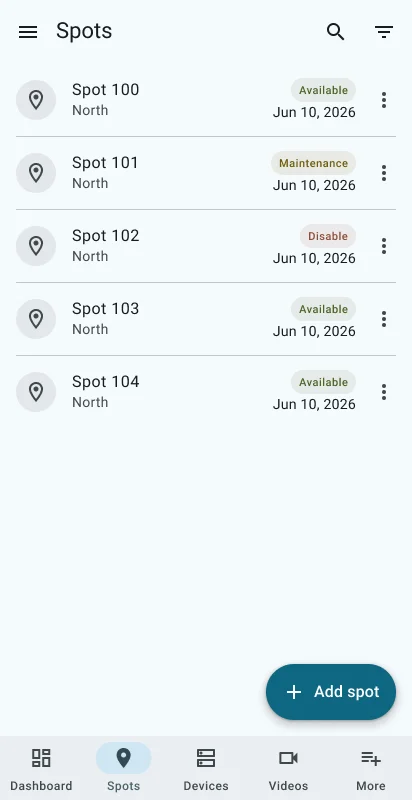
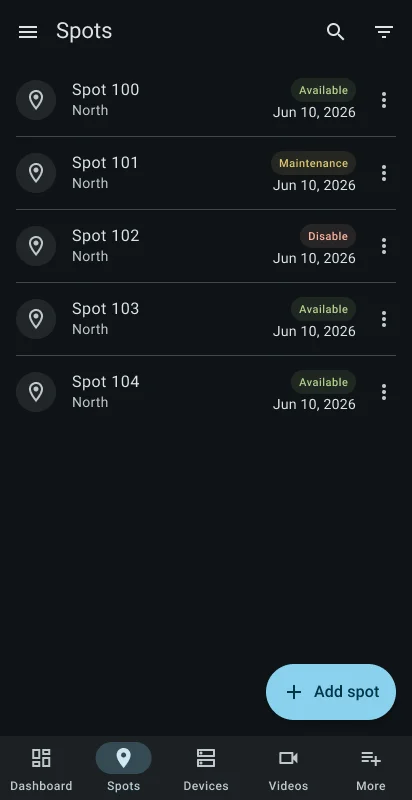
Within a zone, search is applied after a short typing delay. Filters cover spot status—available, maintenance, or disabled—and lifecycle—active or archived. Results are sorted by code and can load additional pages.
Manage inventory
Open Zones
Select Zones and confirm the active site.
Create or open a zone
Use the add button to enter its code, name, description, and display order, or select a zone to view its spots.
Find a spot
Search the zone and combine status and lifecycle filters. Select Load more when additional results exist.
Maintain the spot
Open Details, Edit an active spot, or confirm Archive or Restore. The add form creates a new spot inside the current zone.
Frequently asked questions (FAQ)
The app protects the general zone from editing and lifecycle changes.
You can filter by operational status and by active or archived lifecycle.
No. It searches the spots in the selected zone of the active site.
Related content
- Manager dashboard — Review the active site's summary.
- Devices — Inspect equipment that controls or monitors the site.
- More manager tools — Open site details, reservations, and payments.